Showing posts with label SalesForce. Show all posts

Tuesday, March 11, 2014

Retrieving Blog Post data from Radian6 API

After retrieved the Topic profile related tables, we can retrieve the blog related tables using the ID column
from the "Article" table.

Below is the step to retrieve Blog Post related data:


Create variables as shown below:


Create SQL task the get all IDs from Article table which will be passed along with Topic Profile Id to get data.

apply the following script in SQLStatement area in SQL Task Editor and go to Result Set to get the 
Variable name as User::PostIdResultSet.

SELECT CAST(ID AS VARCHAR(20)), TOPICPROFILEID FROM RAD.ARTICLE
WHERE media_provider <> 'TWITTER'

//here we need separate authentication to access Twitter account hence we don't use Twitter account ids.

Create For Each Loop Container as shown below:


now create Script Task and provide the auth_user, auth_pass and auth_appkey in ReadOnlyVariables
and click EditScript and apply the following script.

---------------------------------------------
#region Help:  Introduction to the script task
/* The Script Task allows you to perform virtually any operation that can be accomplished in
 * a .Net application within the context of an Integration Services control flow. 
 * 
 * Expand the other regions which have "Help" prefixes for examples of specific ways to use
 * Integration Services features within this script task. */
#endregion


#region Namespaces
using System;
using System.Data;
using Microsoft.SqlServer.Dts.Runtime;
using System.Windows.Forms;
using System.Collections.Generic;
using System.Linq;
using System.Web;
//using System.Web.UI;
//using System.Web.UI.WebControls;
using System.Net;
//using System.Web.Script.Serialization;
using System.Text.RegularExpressions;
#endregion

namespace ST_1adf35b5c0614ec086d2bffb896ab7c3
{
    /// <summary>
    /// ScriptMain is the entry point class of the script.  Do not change the name, attributes,
    /// or parent of this class.
    /// </summary>
[Microsoft.SqlServer.Dts.Tasks.ScriptTask.SSISScriptTaskEntryPointAttribute]
public partial class ScriptMain : Microsoft.SqlServer.Dts.Tasks.ScriptTask.VSTARTScriptObjectModelBase
{
       // string auth_user = Dts.Variables["CustomerCount"].Value;
        #region Help:  Using Integration Services variables and parameters in a script
        ............
        #endregion


/// <summary>
        /// This method is called when this script task executes in the control flow.
        /// Before returning from this method, set the value of Dts.TaskResult to indicate success or failure.
        /// To open Help, press F1.
        /// </summary>
public void Main()
{
            string token = "";
            string Json = Call_Rest(token);
            //Response.Write(Json);
            token = Regex.Match(Json, @"\<token\b[^>]*\>\s*(?<token>[\s\S]*?)\</token\>", RegexOptions.IgnoreCase).Groups["token"].Value;
            // Response.Write(token);
            Json = Call_Rest(token);
            string topic = Call_RestFectchData(token);
            Dts.TaskResult = (int)ScriptResults.Success;
}
        public string auth_user
        {
            get
            {
                return Dts.Variables["User::auth_user"].Value.ToString();
            }
        }
        public string auth_pass
        {
            get
            {
                return Dts.Variables["User::auth_pass"].Value.ToString();
            }
        }
        public string auth_appkey
        {
            get
            {
                return Dts.Variables["User::auth_appkey"].Value.ToString();
            }
        }
        public string PostIds
        {
            get
            {
                return Dts.Variables["User::PostIds"].Value.ToString();
            }
        }
        public string TopicProfileId
        {
            get
            {
                return Dts.Variables["User::TopicProfileId"].Value.ToString();
            }
        }
        
         string Call_RestFectchData(string token)
        {
            string responseXml = string.Empty;
            string Url = "https://api.radian6.com/socialcloud/v1/post/workflow/" + PostIds + "/" + TopicProfileId + "";
            using (WebClient client = new WebClient())
            {

                if (token == null || token.Trim() == "")
                {
                }
                else
                {

                    client.Headers.Add("auth_token", token);
                    client.Headers.Add("auth_appkey", auth_appkey);

                }

                try
                {
                    responseXml = client.DownloadString(Url);

                }
                catch (Exception exc)
                {
                    responseXml = "ERROR: " + exc.Message;
                }
            }
            System.IO.File.WriteAllText(@"M:\SSIS\rad\Evangelism\Blogdetails.xml", responseXml);
            return responseXml;
        }
        string Call_Rest(string token)
        {
            //REST call:
            string auth_token = token;
            string responseXml = "";
            string url = "https://api.radian6.com/socialcloud/v1/auth/authenticate";

            ServicePointManager.SecurityProtocol = SecurityProtocolType.Ssl3;
            using (WebClient client = new WebClient())
            {
                //add HTTP headers (for auth)
                client.Headers.Add("auth_appkey", auth_appkey);
                if (auth_token == null || auth_token.Trim() == "")
                {
                    client.Headers.Add("auth_user", auth_user);
                    client.Headers.Add("auth_pass", auth_pass);
                }
                else
                {
                    url = "https://api.radian6.com/socialcloud/v1/topics";
                    client.Headers.Add("auth_token", auth_token);
                }

                //send web request; get web response as XML
                try
                {
                    responseXml = client.DownloadString(url);
                }
                catch (Exception exc)
                {
                    responseXml = "ERROR: " + exc.Message;
                }
            }

            return responseXml;
        }

        #region ScriptResults declaration
        /// <summary>
        /// This enum provides a convenient shorthand within the scope of this class for setting the
        /// result of the script.
        /// 
        /// This code was generated automatically.
        /// </summary>
        enum ScriptResults
        {
            Success = Microsoft.SqlServer.Dts.Runtime.DTSExecResult.Success,
            Failure = Microsoft.SqlServer.Dts.Runtime.DTSExecResult.Failure
        };
        #endregion

}
}

------------------------------------------------------
Get in to DFT, Using XML Source, select the XML file and Generate XSD. From that source, you can map to all the required tables.

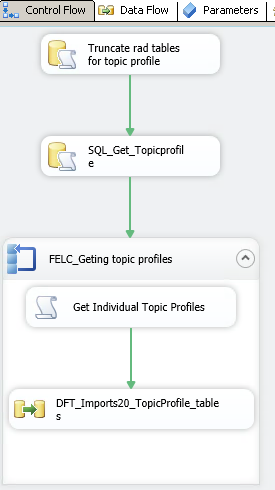


Retrieving all Topic Profile data from Radian6 API

Once we get the Topic Profile detais, we can retrive all the tables related to the particular topicfilterid.

Below is the step to retrive topic related data


Create variables as shown below:


Create SQL task the get all Topicprofile ids which will be passed along with pages to get data.

apply the following script in SQLStatement area in SQL Task Editor and go to Result Set to get the 
Variable name as User::TopicProfileId.

 WITH cte AS(SELECT topicFilterId
, 1 AS PageNo
 FROM rad.TopicProfile
 UNION 
 SELECT topicFilterId
, 2 AS PageNo
 FROM rad.TopicProfile
 UNION 
 SELECT topicFilterId
, 3 AS PageNo
 FROM rad.TopicProfile)

 SELECT topicFilterId, PageNo FROM cte


Create For Each Loop Container as shown below


now create Script Task and provide the auth_user, auth_pass and auth_appkey in ReadOnlyVariables
and click EditScript and apply the following script.

--------------------------------------------------------

#region Namespaces
using System;
using System.Data;
using Microsoft.SqlServer.Dts.Runtime;
using System.Windows.Forms;
using System.Collections.Generic;
using System.Linq;
using System.Web;
//using System.Web.UI;
//using System.Web.UI.WebControls;
using System.Net;
//using System.Web.Script.Serialization;
using System.Text.RegularExpressions;
#endregion

namespace ST_1adf35b5c0614ec086d2bffb896ab7c3
{
    /// <summary>
    /// ScriptMain is the entry point class of the script.  Do not change the name, attributes,
    /// or parent of this class.
    /// </summary>
[Microsoft.SqlServer.Dts.Tasks.ScriptTask.SSISScriptTaskEntryPointAttribute]
public partial class ScriptMain : Microsoft.SqlServer.Dts.Tasks.ScriptTask.VSTARTScriptObjectModelBase
{
       // string auth_user = Dts.Variables["CustomerCount"].Value;
        #region Help:  Using Integration Services variables and parameters in a script
        .............
        #endregion


/// <summary>
        /// This method is called when this script task executes in the control flow.
        /// Before returning from this method, set the value of Dts.TaskResult to indicate success or failure.
        /// To open Help, press F1.
        /// </summary>
public void Main()
{
            string token = "";
            string Json = Call_Rest(token);
            //Response.Write(Json);
            token = Regex.Match(Json, @"\<token\b[^>]*\>\s*(?<token>[\s\S]*?)\</token\>", RegexOptions.IgnoreCase).Groups["token"].Value;
            // Response.Write(token);
            Json = Call_Rest(token);
            string topic = Call_RestFectchData(token);
            Dts.TaskResult = (int)ScriptResults.Success;
}
        public string auth_user
        {
            get
            {
                return Dts.Variables["User::auth_user"].Value.ToString();
            }
        }
        public string auth_pass
        {
            get
            {
                return Dts.Variables["User::auth_pass"].Value.ToString();
            }
        }
        public string auth_appkey
        {
            get
            {
                return Dts.Variables["User::auth_appkey"].Value.ToString();
            }
        }
        public string topicprofile
        {
            get
            {
                return Dts.Variables["User::rowid"].Value.ToString();
            }
        }
        public string Pages
        {
            get
            {
                return Dts.Variables["User::Pages"].Value.ToString();
            }
        }
         string Call_RestFectchData(string token)
        {
            string responseXml = string.Empty;
            string Url = "https://api.radian6.com/socialcloud/v1/data/topicdata/realtime/24/"+topicprofile+"/1,2,3,4,5,6,7,8,10,9,11,12,13,14,16,15/"+ Pages +"/1000?includeWorkflow=1&includeSpam=0&merged=1&token=" + token + "0&extendedMediaTypes=2,3,4";
            using (WebClient client = new WebClient())
            {

                if (token == null || token.Trim() == "")
                {
                }
                else
                {

                    client.Headers.Add("auth_token", token);
                    client.Headers.Add("auth_appkey", auth_appkey);

                }

                try
                {
                    responseXml = client.DownloadString(Url);

                }
                catch (Exception exc)
                {
                    responseXml = "ERROR: " + exc.Message;
                }
            }
            //System.IO.File.WriteAllText(@"M:\SSIS\rad\profiles\topicProfile_"+topicprofile+"_"+ Pages +".xml", responseXml);
            System.IO.File.WriteAllText(@"M:\SSIS\rad\profiles\topicProfile.xml", responseXml);
            return responseXml;
        }
        string Call_Rest(string token)
        {
            //REST call:
            string auth_token = token;
            string responseXml = "";
            string url = "https://api.radian6.com/socialcloud/v1/auth/authenticate";

            ServicePointManager.SecurityProtocol = SecurityProtocolType.Ssl3;
            using (WebClient client = new WebClient())
            {
                //add HTTP headers (for auth)
                client.Headers.Add("auth_appkey", auth_appkey);
                if (auth_token == null || auth_token.Trim() == "")
                {
                    client.Headers.Add("auth_user", auth_user);
                    client.Headers.Add("auth_pass", auth_pass);
                }
                else
                {
                    url = "https://api.radian6.com/socialcloud/v1/topics";
                    client.Headers.Add("auth_token", auth_token);
                }

                //send web request; get web response as XML
                try
                {
                    responseXml = client.DownloadString(url);
                }
                catch (Exception exc)
                {
                    responseXml = "ERROR: " + exc.Message;
                }
            }

            return responseXml;
        }

        #region ScriptResults declaration
        /// <summary>
        /// This enum provides a convenient shorthand within the scope of this class for setting the
        /// result of the script.
        /// 
        /// This code was generated automatically.
        /// </summary>
        enum ScriptResults
        {
            Success = Microsoft.SqlServer.Dts.Runtime.DTSExecResult.Success,
            Failure = Microsoft.SqlServer.Dts.Runtime.DTSExecResult.Failure
        };
        #endregion

}
}

-------------------------------------------------------------------

Get in to DFT, Using XML Source, select the XML file and Generate XSD. From that source, you can map to all the required tables as shown below:


Retrieving Topic Profile list from Radian6 API

The first step in Radiant6 is to get topic profiles from API. To access the API, we need three important 
credentials those are UserName(auth_user), Password(auth_pass) and ApplicationKey(auth_appkey). We can get the appkey from the following site by providing the username and password. 

First, get the username and password for the "https://login.radian6.com/" site. Use this username and password as auth_user and auth_pass. Then get the username and password for the "https://secure.mashery.com/login/socialcloud.radian6.com/" site where in you can get the application key and use that as an auth_appkey in the authorisation part.

//When you have demo login credentials then use the demo site: https://demo-login.radian6.com/

Below is the steps to get topic profiles:

Create variables for the auth_user, auth_pass and auth_appkey as shown below


now create Script Task and provide the parameters in the ReadOnlyVariables as shown below
and click EditScript and applied the code as given below:


------------------------------------------
#region Namespaces
using System;
using System.Data;
using Microsoft.SqlServer.Dts.Runtime;
using System.Windows.Forms;
using System.Collections.Generic;
using System.Linq;
using System.Web;
//using System.Web.UI;
//using System.Web.UI.WebControls;
using System.Net;
//using System.Web.Script.Serialization;
using System.Text.RegularExpressions;
#endregion

namespace ST_1adf35b5c0614ec086d2bffb896ab7c3
{
    /// <summary>
    /// ScriptMain is the entry point class of the script.  Do not change the name, attributes,
    /// or parent of this class.
    /// </summary>
[Microsoft.SqlServer.Dts.Tasks.ScriptTask.SSISScriptTaskEntryPointAttribute]
public partial class ScriptMain : Microsoft.SqlServer.Dts.Tasks.ScriptTask.VSTARTScriptObjectModelBase
{
       // string auth_user = Dts.Variables["CustomerCount"].Value;
        #region Help:  Using Integration Services variables and parameters in a script
       ......
        #endregion


/// <summary>
        /// This method is called when this script task executes in the control flow.
        /// Before returning from this method, set the value of Dts.TaskResult to indicate success or failure.
        /// To open Help, press F1.
        /// </summary>
public void Main()
{
            string token = "";
            string Json = Call_Rest(token);
            //Response.Write(Json);
            token = Regex.Match(Json, @"\<token\b[^>]*\>\s*(?<token>[\s\S]*?)\</token\>", RegexOptions.IgnoreCase).Groups["token"].Value;
            // Response.Write(token);
            Json = Call_Rest(token);
            string topic = Call_RestFectchData(token);
            Dts.TaskResult = (int)ScriptResults.Success;
}
        public string auth_user
        {
            get
            {
                return Dts.Variables["User::auth_user"].Value.ToString();
            }
        }
        public string auth_pass
        {
            get
            {
                return Dts.Variables["User::auth_pass"].Value.ToString();
            }
        }
        public string auth_appkey
        {
            get
            {
                return Dts.Variables["User::auth_appkey"].Value.ToString();
            }
        }
         string Call_RestFectchData(string token)
        {
            string responseXml = string.Empty;
            string Url = "https://api.radian6.com/socialcloud/v1/topics?includeReactivation=true";
            using (WebClient client = new WebClient())
            {

                if (token == null || token.Trim() == "")
                {
                }
                else
                {

                    client.Headers.Add("auth_token", token);
                    client.Headers.Add("auth_appkey", auth_appkey);

                }

                try
                {
                    responseXml = client.DownloadString(Url);

                }
                catch (Exception exc)
                {
                    responseXml = "ERROR: " + exc.Message;
                }
            }
            System.IO.File.WriteAllText(@"M:\SSIS\rad\TopicProfile.xml", responseXml);
//here the TopicProfile xml file will be generated in the provided path
            return responseXml; 

            
        }
        string Call_Rest(string token)
        {
            //REST call:
            string auth_token = token;
            string responseXml = "";
            string url = "https://api.radian6.com/socialcloud/v1/auth/authenticate";


            ServicePointManager.SecurityProtocol = SecurityProtocolType.Ssl3;
            using (WebClient client = new WebClient())
            {
                //add HTTP headers (for auth)
                client.Headers.Add("auth_appkey", auth_appkey);
                if (auth_token == null || auth_token.Trim() == "")
                {
                    client.Headers.Add("auth_user", auth_user);
                    client.Headers.Add("auth_pass", auth_pass);

                }
                else
                {
                    url = "https://api.radian6.com/socialcloud/v1/topics";

                    client.Headers.Add("auth_token", auth_token);
                }

                //send web request; get web response as XML
                try
                {
                    responseXml = client.DownloadString(url);

                }
                catch (Exception exc)
                {
                    responseXml = "ERROR: " + exc.Message;

                }
            }

            return responseXml;
        }

        #region ScriptResults declaration
        /// <summary>
        /// This enum provides a convenient shorthand within the scope of this class for setting the
        /// result of the script.
        /// 
        /// This code was generated automatically.
        /// </summary>
        enum ScriptResults
        {
            Success = Microsoft.SqlServer.Dts.Runtime.DTSExecResult.Success,
            Failure = Microsoft.SqlServer.Dts.Runtime.DTSExecResult.Failure
        };
        #endregion

}
}
----------------------------------------------
now get into DFT and create XML Source task. In XML Source Editor, select the Data access mode as XML file location and brows the xml file location. Then click Generate XSD button to create XSD and provide the path to save it. Map the requried columns with the corresponding table.


Friday, March 7, 2014

SalesForce - Radian6 API

Radian6 is a platform that enables organizations to monitor and engage in conversations across the social web. When you configure a search, the Radian6 platform retrieves results from more than 150 million sites and sources including:
  •  Mainstream News
  •  Blogs
  •  Forums
  •  Comments
  •  Photo And Video Sharing Sites
  •  Twitter Firehose
  •  Public Facebook API 
The platform contains the following elements. You can select from the following Radian6 elements to meet your listening, measuring and engagement needs:

Analysis Dashboard: A web-based social media monitoring and engagement platform that brings you real-time online conversations based on your searches.

Summary Dashboard: A convenient, pre-configured application that presents an easy-to-read view of the volume, overall sentiment, key demographics, influencers and more around your conversations of interest.

Insights: Combines Radian6 data with information provided by third-party data partners to help you discover more about what lies behind each post. What’s the author’s gender? Their age group? Where do they live? 
What are their other interests? Generate lists of the most talked-about people, places, and things, with a 
deeper assessment of sentiment.

Radian6 Mobile App: Radian6 Mobile brings key engagement functionality from the Radian6 platforms to your 
iPhone. Engage directly with your community or use workflow to route posts to the most appropriate people, 
while away from your desk. Radian6 Mobile is available for free to current Radian6 Engagement Console users.

Engagement Console: Coordinate your team’s interaction with relevant social media posts returned by 
Radian6. You can assign posts for team members to follow up with, and interact with your team as they carry out their assignments. You can directly access and use personal or team Twitter and Facebook accounts from the Engagement Console.

You can use Radian6 for a number of different purposes:

  • Manage and Monitor Conversations: Understand the life cycle of information you send out to the world. Track the spread of your campaign, press release, or other communications in real time on the web. Follow it as it gets resurrected in blog posts, case studies, or other references online.Respond to Customers in Real Time: Build contacts with key influencers and communicate with them to obtain more information.
  • Generate Sales Leads: Identify potential events or find key influencers who are sharing information about up and coming issues.
  • Obtain Competitive Intelligence: Keep track of what your competition is up to. Compare your mentions to those of your competition.
  • Understand Industry Trends: Follow what’s being said within your industry and identify needs in your potential market.
  • Manage Crises: Be the first to know when issues spring up. Use intelligence to aid in providing sound and speedy counsel. Identify and manage concerns quickly.